Interview transcription and AI notes for recruiters.
No more lost details after candidate calls. Sonarnote records your hiring conversations locally, creates clear speaker-labeled transcripts, and organizes the key points into searchable notes your whole recruitment team can use.
- Recorded locally
- No bots in your call
- No model training on your data
- EU-based, GDPR-ready
Works on every platform, joins none of them. Sonarnote records from your desktop, so no bot enters the call.
 Zoom
Zoom Google Meet
 Microsoft Teams
 Slack
SlackEverything you need to run and review interviews.
Record any interview, turn it into a clean speaker-labeled transcript with AI notes, and search every word later, all from one place.
Record interviews without bots.
Sonarnote records audio locally from your computer, so no clunky meeting bot joins the call and no calendar connection is needed. Works with Zoom, Google Meet, Microsoft Teams, Slack, or any platform you already use.
- Records locally, nothing joins the call
- Works on every video platform
- No calendar or account access needed
Speaker-labeled transcripts, minutes after you stop.
Stop the call and Sonarnote starts processing. By the time your debrief is done, the transcript is ready, searchable, and structured.
- Diarized by speaker
- Word-level accuracy
- Jump-to-quote timestamps
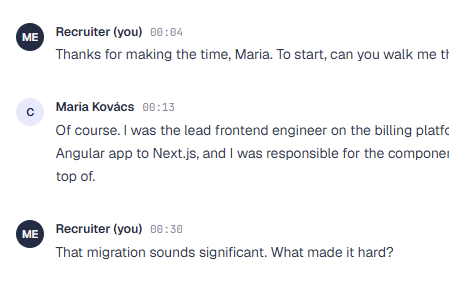
Record the brief, get the shortlist.
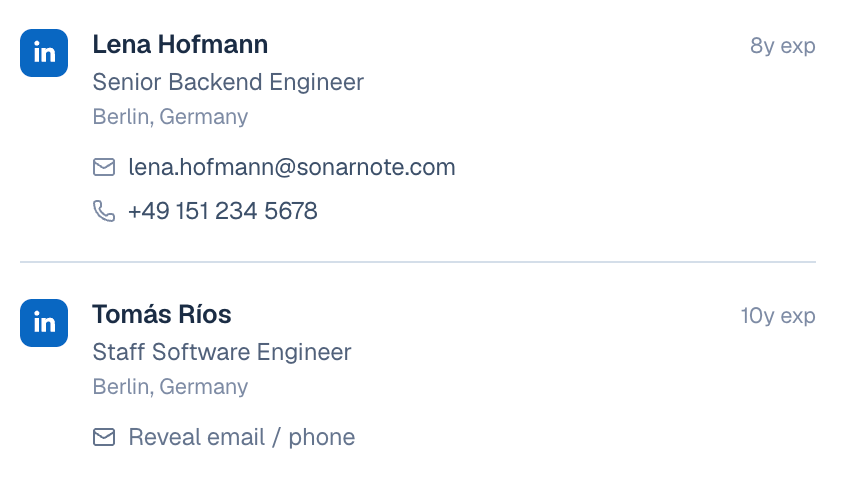
Record the intake call with your hiring manager and Sonarnote pulls every requirement, searches LinkedIn, and screens real people against each must-have. You leave the brief with a vetted shortlist, not a blank search box.
- Requirements pulled from the brief
- Real profiles, screened per requirement
- Email and phone on demand
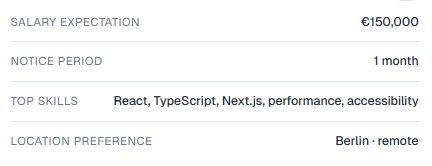
The key points pulled out for you.
Every interview becomes a clean summary with the facts that matter, mapped to the role so your team reads signal, not raw transcript.
- Auto summary per call
- Mapped to your scorecard
- Share-ready in one click
Four simple steps from live interview to searchable notes.
Launch Sonarnote before your call.
Run the call as normal on any platform.
Stop recording and Sonarnote starts processing.
Get a speaker-labeled transcript in minutes.
The signal in every interview,
not just the ones you remember.
AI meeting bots vs Sonarnote.
The bot joins. Sonarnote doesn't. Same transcript, same AI notes, no third party in the room.
| Capability | AI meeting bots | Sonarnote |
|---|---|---|
| No bot joins the call | - | |
| Zero calendar permissions | - | |
| Zoom, Meet, Teams, any platform | - | |
| No host approval needed | - | |
| Speaker-labeled transcript | ||
| Searchable AI interview notes |
Interview recording, answered.
Does a bot join the call?
No. The desktop app captures system audio on your computer, so it records whatever you hear on the call. Nothing joins your Zoom, Google Meet, or Teams meeting, and the candidate sees only you.
Which platforms does it work with?
Any. Because recording happens at the OS level, it is platform-agnostic. The same flow works for Zoom, Google Meet, Microsoft Teams, and Slack huddles.
How accurate are the transcripts?
98.4% word-level accuracy on US-English interviews, benchmarked against human-transcribed audio, with each speaker labeled.
How fast do I get the transcript?
About two minutes from "stop recording" to a finished, diarized transcript and searchable notes landing in your dashboard.
Do you need access to my calendar?
No. Sonarnote does not require calendar access to record an interview. Calendar sync is an optional convenience for organizing recordings against jobs.
What does it cost?
Plans start at $19 per seat per month and include a 7-day free trial with no credit card required.
Pay for the seats that actually run interviews.
No "AI credits." No surprise bills. Pick a monthly hour bucket and get the full recorder, transcription, AI scorecard, and search. Upgrade anytime.
For recruiters who want a searchable archive and predictable per-seat usage.
Start free trial7-day free trial. No credit card required.
For structured hiring loops that need richer analysis across every recruiter.
Start free trial7-day free trial. No credit card required.
Your next interview should be on record.
Open the dashboard, hit record before your next call, and you're capturing in seconds. No bots, no calendar invites, no surprises.